EDWARD'S LECTURE NOTES:
More notes at http://tanguay.info/learntracker
C O U R S E
Programming Mobile Applications for Android
Adam Porter, University of Maryland
 |
C O U R S E L E C T U R E Fields of the Intent Class Notes taken on June 25, 2014 by Edward Tanguay |
•
the intent class is basically a data structure
•
it serves two purposes in Android:
•
1. specifies an operation
•
2. represent an event that has occurred in the system that you want to notify other components about
•
intents are a kind of language for specifying operations that you want to have performed
•
give you an easy way to say:
•
"I want to select a contact"
•
"I want to take a photo"
•
"I want to dial a phone number"
•
"I want to display a map"
•
intents are usually constructed by one activity that wants some work to be done, and Android uses that intent to start another activity that can perform the desired work
•
intent fields
•
action
•
names the operation to be performed
•
e.g.
•
ACTION_DIAL
•
dials a number
•
ACTION_EDIT
•
allows user to edit some piece of data
•
ACTION_SYNC
•
synchronizess device data on device with data on a server
•
ACTION_MAIN
•
start an activity as an initial activity of an application
•
you can pass an intent action to the constructor
•
Intent in = new Intent(Intent.ACTION_DIAL)•
you can also call the
setAction() method•
data
•
data associated with the intent
•
formatted as a URI
•
data to view on a map, e.g.
Uri.parse("geo:0,0?q=452+Smith+St.+Denver+CO")•
phone number to call, e.g.
Uri.parse("tel:+1555555555")•
Uri.parse returns a URI object
•
you can set it in the construtor or use
setData()•
category
•
additional information about the kinds of components that can or should handle this intent
•
examples
•
CATEGORY_BROWSABLE
•
invoked by browser
•
CATEGORY_LAUNCHER
•
can be the initial activity of a task
•
type
•
the mime type of intent data
•
IMAGE/PNG, IMAGE/JPG
•
TEXT/PLAIN, TEXT/HTML
•
if unspecified, it will try to infer it
•
can use
setDataAndType()•
component
•
identifies the intent's target activity
•
if one activity should always receive this intent
•
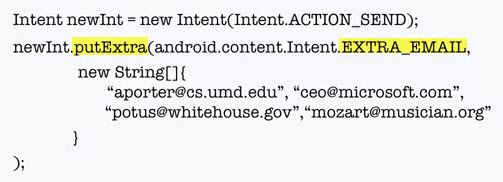
extras
•
additional information associated with the intent
•
map of key/value pairs
•
needs to know the type
•
e.g. Intent.EXTRA_EMAIL
•
flags
•
represent information on how intent should be handles
•
e.g.
•
FLAG_ACTIVITY_NO_HISTORY
•
don't put this activity in the history stack
•
FLAG_DEBUG_LOG_RESOLUTION
•
print extra logging information when this intent is processed