EDWARD'S LECTURE NOTES:
More notes at http://tanguay.info/learntracker
C O U R S E
MongoDB for Node.js Developers
Andrew Erlichson, MongoDB University
 |
C O U R S E L E C T U R E Basic Querying in MongoDB Notes taken on June 11, 2014 by Edward Tanguay |
•
CRUD/Mongo/SQL terminology
•
Create = Insert = INSERT
•
Read = Find = SELECT
•
Update = Update = UPDATE
•
Delete = Remove = DELETE
•
MongoDB's CRUD operation exist as methods/functions in programming language APIs
•
MongoDB does not have a separate language that needs to be embedded as strings inside code that operates on MongoDB
•
as a developer, you manipulate the database using methods on objects, similar to a object mapping with RDBMS
•
this makes database I/O with MongoDB relatively pleasant for programmers
•
the Mongo shell
•
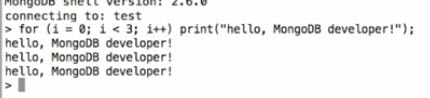
the Mongo shell is an interactive JavaScript interpreter
•
pay attention to the version number when you log in
•
you can type in javascript at the command line
•
up arrow retrieves previous commands
•
ctrl-a to front of line
•
built-in helpers
•
help
•
help keys
•
command completion
•
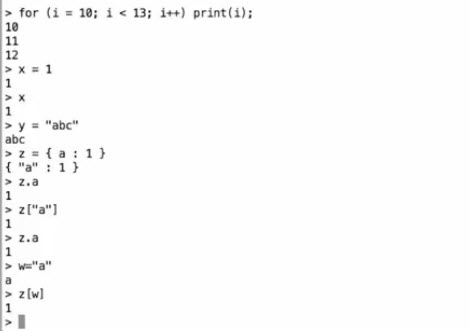
basic javascript variable assignment
•
BSON
•
fundamental record type is a nested dictionary of key/value associations
•
javascript objects, because they are in dictionary/JSON form, can be saved directly into the database
•
JSON was inspired by the syntax of JavaScript
•
MondoDB does not use this stringy syntax
•
http://bsonspec.org ; BSON spec ; BSON is binary JSON, has data types that go beyond JSON, e.g. datetime, 32 and 64 bit integer type, etc.
•
in the shell we use JavaScript and we can force the types of numbers
•
NumberInt(1)
•
NumberLong(1)
•
but be careful with languages such as JavaScript or Perl which can't represent all of the types that BSON can represent
•
new Date() or ISODate(...)
•
so you can faithly handle all of the data that comes out of the database by casting it like this:

•
inserting docs
•
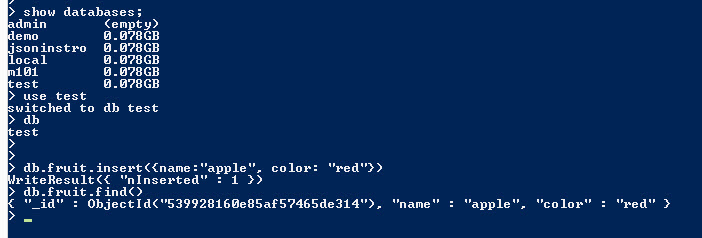
the shell has a variable named db which is a handle to the current database
•
collections are properties of the database, e.g. db.people.insert(doc)
•
when you insert a document, it gets a unique field "_id"
•
different from other databases, the primary key is immutable
•
you could similate changing the id by removing a document, and inserting it again so it gets another id
•
_id is the primary key
•
_id is always ObjectId made up of date, machine, process id on computer, and a counter, so these ideas are globally unique
•
if you don't insert an _id, then one will be generated for you
•
finding documents
•
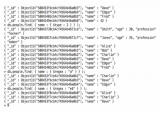
db.fruit.find() will find all•
db.people.findOne({name:"Jones"})•
the query is presented to the server in the form of a structured document
•
the second argument allows you to specify which fields you want to get back, true or false

•
_id is included by default•
find
•
fill database so we can do some queries:

•
db.people.find() to see them all•
type
it iterate through the results•
shell is keeping these results open
•
cursor is on the server, will clear it in 10 minutes
•
dp.people.find().pretty() to see results formatted•
when multiple fields are given in the first parameters of find(), then it assumes AND
•
these are called "query by example" queries
•
query operators
•
db.scores.find({ score : { $gt : 95, $lte : 95}) (greater-than, less-than-or-equal)•
>, < etc. can also be applied to strings
•
currently sorts asciibetically
•
future versions should have better support
•
all comparison operations are strongly typed
•
if you filter by less than "A", you will not get numbers
•
generally, you should not mix types in one named field, e.g. store 42 in a name
•
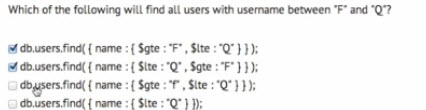
here the third item will not work since comparisons are case sensitive
•
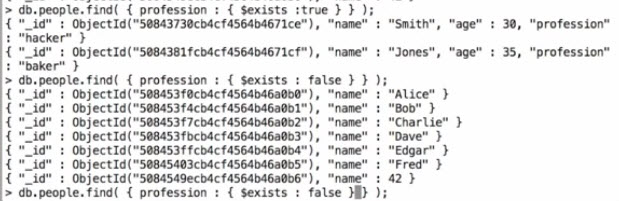
querying on whether field exists
•
you can check for a type, use the BSON specifications, so string = 2:
•
do.people.find({name:{$type:2}})•
you can also use regexs:
•
all names that end with "e"
